
Six steps, and then
it runs itself
From signing up to rent landing in your bank. Steps one to four are you, once. Step five is your driver. Step six happens every week without either of you doing anything.
- 1
Sign up as a merchant
Youabout 2 minutesYour name, your business name, and the currency you rent in. No card is asked for and nothing is charged — the first 30 days are free.
- 2
Connect your Stripe account
Youabout 5 minutesThis is how your drivers pay you. Sign in with the Stripe account you already have, or make one — either way the rent lands in your account and goes out to your bank on your own payout schedule. Wheelo never holds it and never takes a cut of it.
- 3
Add your cars, then invite your drivers
YouFor each car: the plate, make and model, and the registration and insurance expiry dates so we can remind you before they run out. Then invite each driver by email. They get a link, create their own account, and fill in their own details and licence — you never type their paperwork for them.
- 4
Once a driver accepts, create the agreement and give them a car
YouPick the car and the driver, set the weekly rent, choose which weekday their rental week starts, and whether they pay by card or by cash. Use Wheelo's standard contract, or upload your own PDF.
- 5
Your driver signs it and adds their card
Your driveron their phoneThey read the agreement and sign with their name — time-stamped, with the exact wording frozen so it can't be argued about later. Then they enter their card on Stripe's own page. Only they can do this; you only ever see the last four digits.
- 6
Rent collects itself, every week
AutomaticWhen each rental week ends, the driver is emailed the day before their card is charged, then the money is taken and lands in your account. Your home screen shows who has paid and who is behind, as it happens.
How long does all of that take? Steps 1 to 4 are usually one sitting — under half an hour for your first car and first driver. Step 5 is the driver, on their own phone, in a few minutes. After that you only ever repeat steps 3 and 4 when a new car or a new driver joins.
Step six, in detail: the weekly clock
This is the part that repeats. Below is a rental whose week runs Monday to Sunday — every rental keeps its own week, so a fleet's charges spread across the days rather than all landing on one.
The week's bill is raised. Anything added during the week — a toll, a fine, damage, a waiver — lands on this same bill.
Nothing is taken yet. The week has simply closed.
The driver is emailed the amount and the exact date it will be taken.
The card is charged — only for what's still owing: the total, minus cash you recorded, minus anything you waived.
What your driver sees
Their own portal, in their phone browser — nothing to install. It answers the two things they would otherwise ring you about: what do I owe, and when is it taken?
- · They control their own card. You see the last four digits only.
- · Renting from two businesses keeps those two completely separate.
- · They can give notice, pick a last day, and leave once nothing is owed.
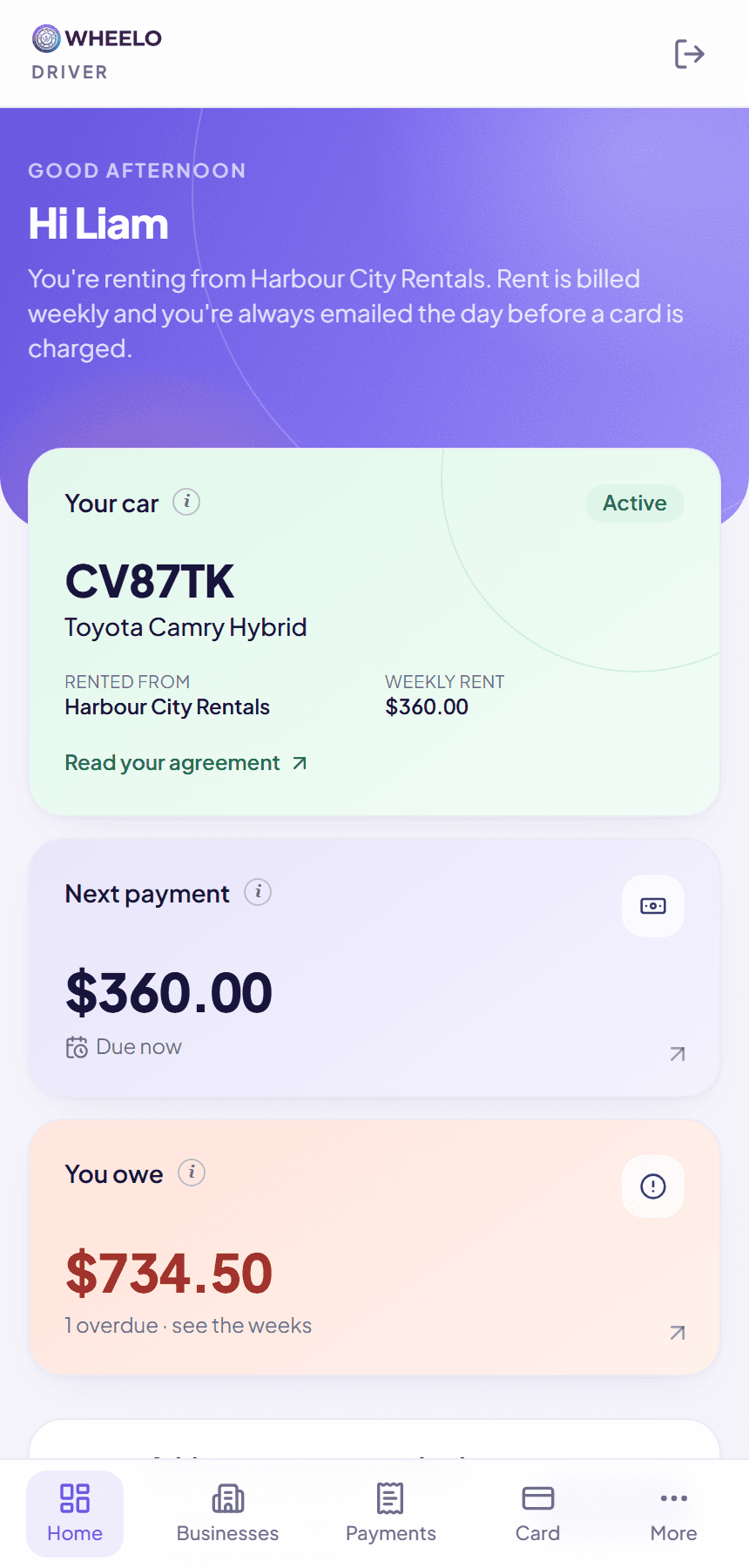
And when life happens…
Rentals rarely run in a straight line. Here is what the system does about the six things that actually come up.
A card is declined
Both of you are told straight away, in plain words. We try again the next night, up to three attempts, then leave the week marked overdue rather than hammering the card. If the driver says the money is in, press Charge now.
A driver pays you in cash
Record it against that week in one tap; the driver gets an emailed receipt. Part payments are fine — what's left stays owing. You can waive an amount too, and the card is only ever charged what genuinely remains.
A fine or toll notice arrives
Enter the car and the date and time printed on the notice. Wheelo works out which driver had that car at that minute and adds the amount to their next weekly bill.
A driver has no card yet
Nothing is lost. The weeks are still billed and tracked as owing, and you can record cash in the meantime. When a card finally appears, the backlog is collected one week a night, oldest first — with a warning email first.
A rental ends part-way through a week
The final week is worked out day by day. A driver who starts on a Wednesday is billed for four days, not seven, and the same applies at the end.
The car comes back
Either side gives notice and picks a last day. Rent runs to that day and no further. The car stays assigned until you confirm it's physically back — so it can never be promised to two drivers at once.
There are around fifty of these cases written down in full. Ask us for the scenarios handbook and we'll send you the PDF.
Straight answers
The things merchants ask before they start.